Learn parallel parking in 7 short steps.
Practice Parking is a free online parallel parking simulator for learner drivers, with a 3D driver’s-seat view and a top-down map. Try a park right away, or follow the steps: each one has one clear goal, and you can skip ahead at any time.
Jump straight into a park, or learn it one step at a time. No account needed. Explore on my own
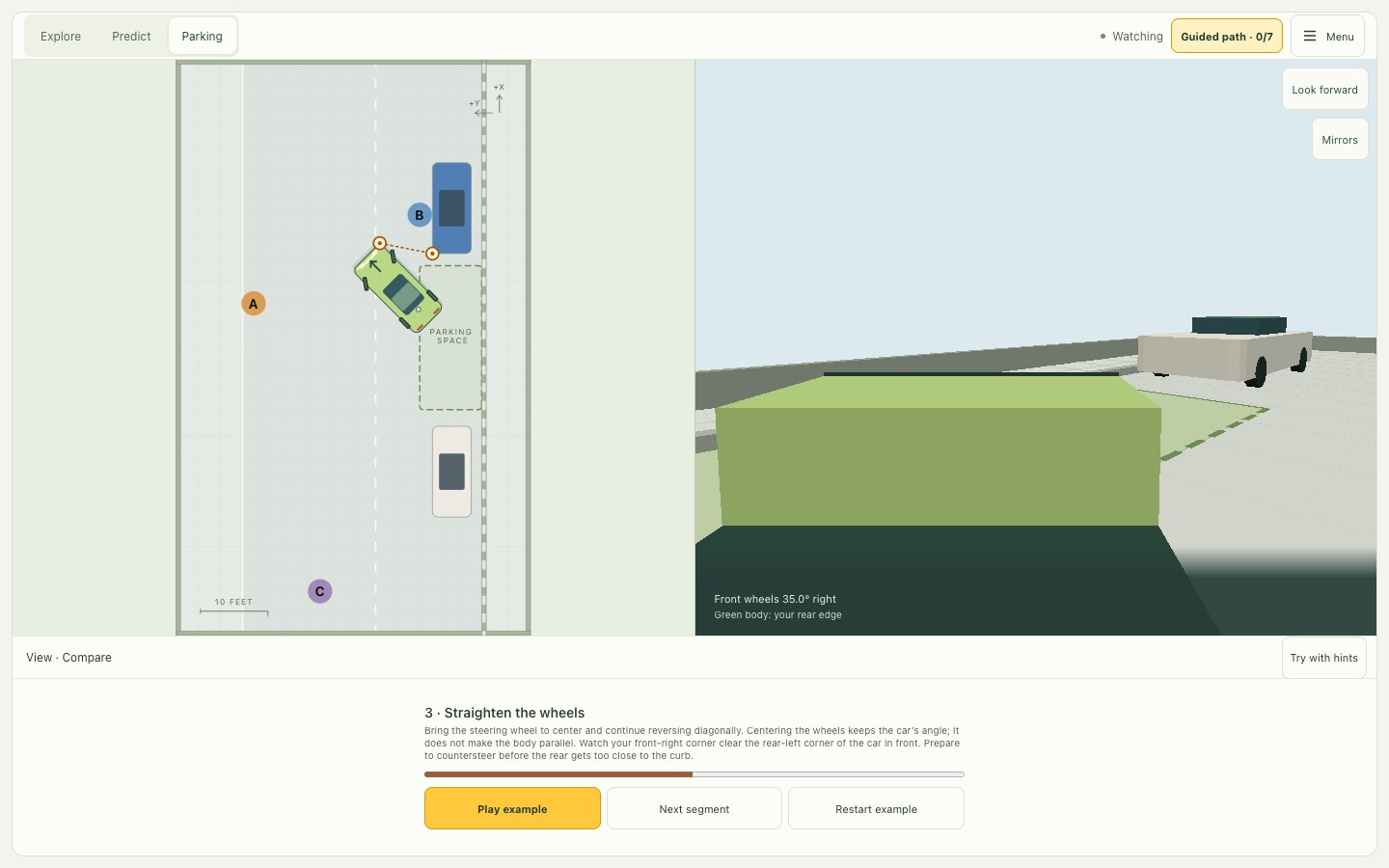
See the car from above and from the driver’s seat, at the same moment
Parallel parking is hard because you can’t see where the back of your car is going. The map shows it, while the driver’s view shows what you would check in real life.
- Stop at any moment and compare the two views.
- Look back over your shoulder or check the mirrors, as in a real car.
- Watch each move of a full park, one step at a time.
How to parallel park in five stages
The short version of the simulator’s guided park. The full guide has a diagram for each stage and what to watch.
Read the full guide with diagramsCheck your position
Stop beside the front parked car, then reverse straight until your rear axle passes its rear bumper.
Reverse while turning right
Turn the wheel fully right and reverse slowly until the car is at about 45° to the curb.
Straighten the wheels
Center the wheel and keep reversing diagonally while your front corner clears the car in front.
Countersteer into the gap
Turn the wheel left and keep reversing so the front swings in behind the car ahead.
Straighten and adjust
Center the wheel once the car is parallel, move to balance the gaps, then stop.
About the simulator
What people ask before they start: the views, the feedback, the controls, and cost.
Is Practice Parking 2D or 3D?
Both. The 3D view puts you in the driver’s seat, with a look-back view over your shoulder and the side mirrors. The top-down map shows the same car at the same moment, and Compare view shows the two side by side.
What feedback do I get after a park?
Every park is measured: your distance from the curb (in inches or centimeters), your angle to the curb, the space left in front and behind, how many times you switched between forward and reverse, and any contact with the curb or another car. It also says what to fix next.
Is there a test-like mode without help?
Yes. Park without hints starts in the 3D driver’s seat with no guide lines or hints, so you rely on the mirrors and looking back, as on a road test. You can still switch to the map, but the park then counts as assisted.
How do I control the car?
With the on-screen buttons on a phone or tablet, with the keyboard on a computer (arrow keys or W, A, S, D, and C to center the wheel) and a steering slider, or with a game controller such as an Xbox or PlayStation controller (the stick steers, the triggers drive and reverse).
Is it free, and is there a time limit?
It is free, with no account and no time limit, and runs in the browser on phones, tablets, and computers. It focuses on parallel parking, with guides to state road test rules and parking on a hill.
Will other kinds of parking come?
Not yet: today the simulator covers parallel parking only. What comes next depends on what learners ask for, so vote below or write to us.